AI can draft an email, summarize a customer record, or suggest the next step in seconds.
But a business needs more than a capable model. It needs the right information, tools, permissions, approvals, recovery rules, and activity records around that model.
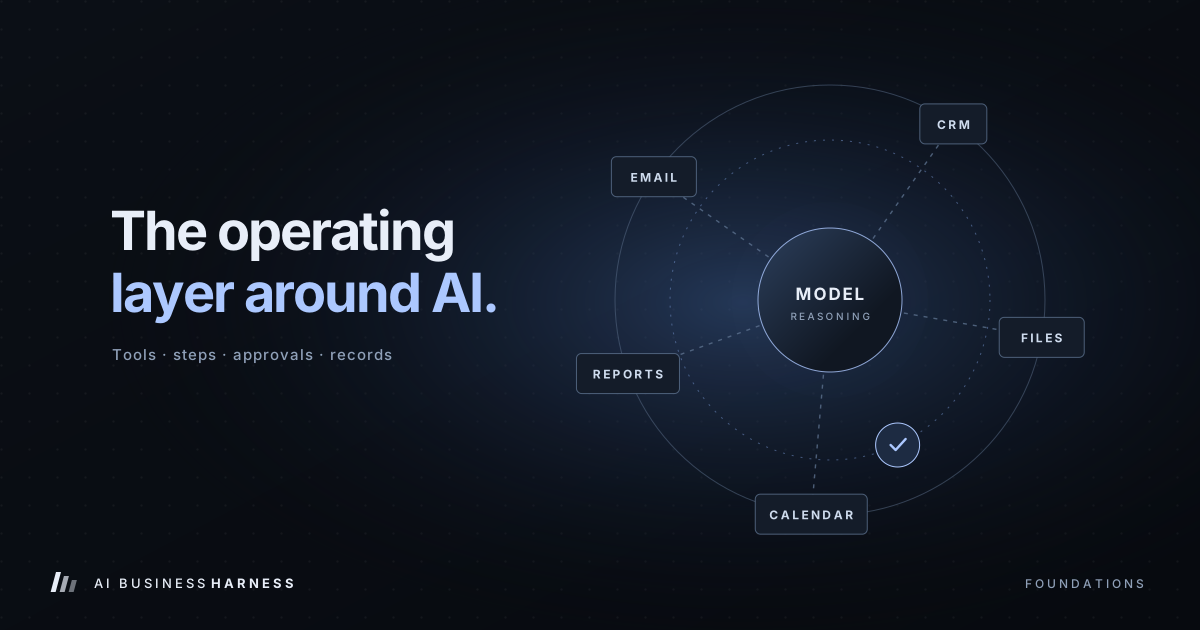
That operating layer is an AI business harness.
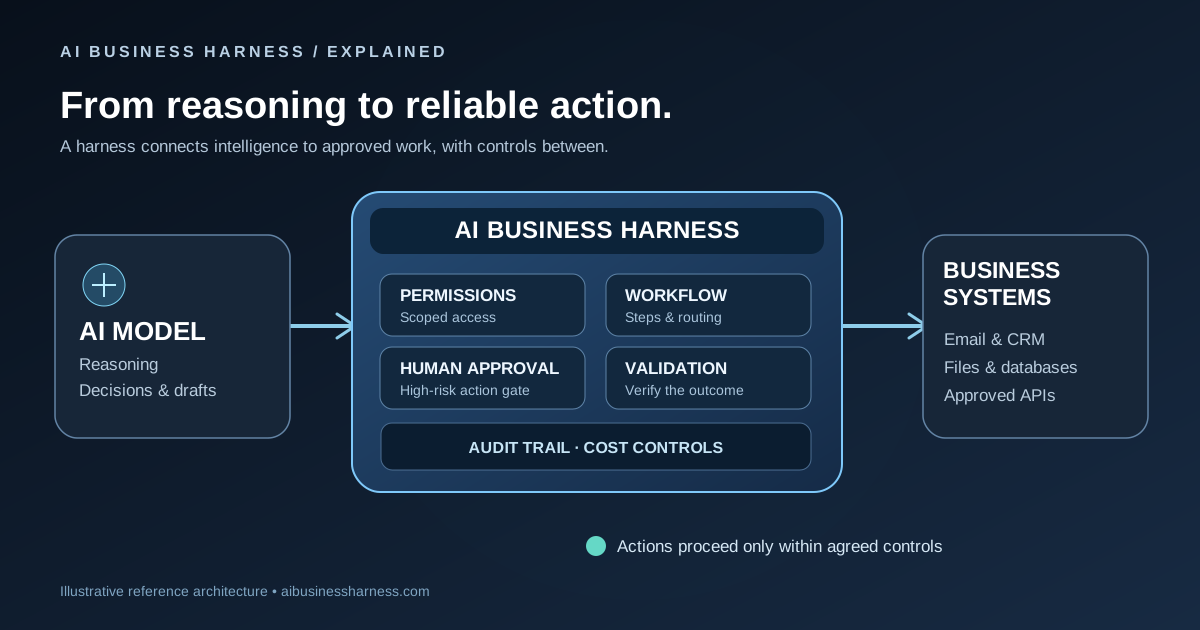
An AI business harness connects AI to approved business systems, guides work through defined steps, pauses when a person needs to decide, checks whether actions actually worked, and records what happened. It helps a business use AI without treating the model as an unsupervised employee or replacing judgment where judgment matters.
An AI agent can help decide and do. AI Business Harness connects that capability to your business's tools, permissions, approvals, and operating procedures—then manages the workflow and tracks what happens.
This guide explains:
- What an AI business harness is
- How it differs from an AI agent
- The nine components of a business harness
- How human approvals and recovery work
- How the approach applies to enterprise teams and small businesses
- Examples for dealerships, bakeries, local service companies, and real estate brokerages
- How to measure whether an AI workflow is helping
AI business harness: a plain-English definition
An AI business harness is the operational system that wraps around an AI model or agent and makes it usable inside a real business. (For a shorter introduction, see what an AI business harness does.)
Think of it this way: the AI model is the engine; the harness is the rest of the car.
An AI model can draft, summarize, classify, and suggest. On its own, it does not reliably know:
- Which customer record is correct
- Whether an estimate is still open
- Which systems it is allowed to access
- Which employee can approve a discount
- Whether a calendar reservation actually succeeded
- Whether a message was already sent
- What to do when an external system times out
- What evidence should be retained for later review
Those are business-process questions, not just language questions.
The harness supplies the surrounding operating structure: connections to approved systems, permissions, state and memory boundaries, business rules and validation, human approval gates, recovery and reconciliation, duplicate-action protection, monitoring and audit, and workflow orchestration.
Harness engineering is the practice of designing, building, operating, and improving that system.
The model provides reasoning. The harness provides the tools, controls, safeguards, context, and activity history needed to use that reasoning responsibly in a business.
AI model vs. AI agent vs. AI business harness
These terms are related but not interchangeable.

| Layer | Main responsibility | Estimate follow-up example |
|---|---|---|
| AI model | Interprets information and generates outputs | Drafts a follow-up message |
| AI agent | Chooses steps and uses tools toward a goal | Checks the estimate and prepares the next action |
| AI business harness | Coordinates execution and enforces business controls | Checks access, obtains approval, protects against duplicate sends, and records outcomes |
An AI agent chooses steps and uses tools toward a goal. An AI business harness coordinates that work within the business's permissions, approvals, operating procedures, and monitoring. These responsibilities may be built into the same system.
The distinction is about responsibility and operational design, not necessarily separate software products. A mature agent product may include many harness capabilities. (See what one managed agent product covers and what it doesn't for an example.) A harness may also support structured workflows that use model calls without full agent autonomy. (Go deeper on the AI model, agent, and harness difference.)
This framing avoids several overstatements:
- Agents do not inherently lack accountability. Their controls depend on the implementation.
- A harness is not entirely deterministic. Model-based routing may still be part of it, while critical permissions should be enforced independently of model judgment.
- An agent without a separate harness is not automatically unsafe. The necessary controls may already be integrated.
- A useful harness workflow does not always require an autonomous agent.
Why an AI business harness matters
A model can produce a convincing answer while still being wrong for the business. It may:
- Use an outdated record
- Address the wrong customer
- Promise an unavailable appointment
- Expose confidential information
- Prepare a message that violates policy
- Retry an external action and create a duplicate
- Assume a failed API request succeeded
A harness helps move the workflow from "The AI generated something" to "The business can inspect, review, verify, and measure what happened."
An AI business harness helps businesses:
- Use current, authorized information rather than relying only on a prompt.
- Limit access to the systems and data required for the task.
- Keep people involved where a mistake would be expensive, difficult to reverse, or customer-facing.
- Recover from failures instead of assuming a timeout means success or failure.
- Prevent duplicate actions such as repeated messages, bookings, or submissions.
- Measure the workflow against a baseline rather than assuming automation helped.
- Improve the process by reviewing exceptions, edits, approvals, and outcomes.
The nine components of an AI business harness
1. Connections
Connections link the workflow to authorized systems and data, such as a CRM, inbox, calendar, inventory system, POS, property listing feed, document store, or scheduling platform.
The harness should retrieve current, authorized information rather than relying only on what was placed in the prompt. Each connection should have a defined purpose and the narrowest practical permissions. See how to connect AI to existing business software, and when to use browser automation versus API integrations for legacy tools.
2. Permissions and access control
Permissions limit what each user, agent, or workflow can read and do.
A customer-inquiry workflow may need access to an inbox and selected CRM records. It probably does not need access to payroll, bank feeds, or an entire shared drive. Sensitive data, credentials, and high-risk actions should remain restricted by role and policy.
3. State and memory boundaries
Short-term workflow state allows a process to pause and resume. Longer-term context may include approved preferences, business rules, policies, customer-specific information, and workflow history.
These boundaries should be explicit. Agents should not automatically share raw conversation history, private notes, or data across unrelated clients, roles, or sessions.
4. Validation and business rules
Validation checks known rules before an action proceeds. Examples include:
- Is the estimate still open?
- Is the requested appointment available?
- Is the vehicle in authorized inventory?
- Is a price exception within policy?
- Does the listing have the latest available authorized status?
- Does a dietary request require trained staff review?
Validation surfaces issues. It does not replace human, legal, regulatory, or professional judgment.
5. Human approval gates
Approval gates pause the workflow and route a specific action to a person for review. That action might be an exact customer message, a quote, a booking, a pricing exception, a regulatory submission, or a customer-record update.
Approval should be bound to the exact proposed action. If the recipient, content, amount, attachment, timing, or source data changes, the workflow should require re-approval. Read more on human approval in AI workflows.
6. Recovery and reconciliation
Business systems fail in ordinary ways: APIs time out, records change, webhooks arrive late, payment providers return uncertain results, CRM writes fail, and browser sessions disconnect.
Recovery and reconciliation determine what happens next. The workflow may retry safely, queue the item, escalate to a person, verify the external system, mark the action as uncertain, or request manual confirmation. It should not invent a result or assume that an ambiguous response means the action completed.
7. Duplicate-action protection
Transactional claims prevent concurrent execution. Provider idempotency and reconciliation address retries and uncertain delivery.
Together, these controls help prevent the same email, text message, booking, CRM update, payment request, or report submission from being executed twice. The exact protection depends on the business system and provider capabilities.
8. Monitoring, logging, and audit
Monitoring shows whether the workflow is running. Logs record what happened. An audit trail makes important decisions and actions reviewable.
Useful records may include:
- What triggered the run
- Which authorized records or source versions were used
- What the system decided and why
- Which actions were attempted
- Whether the result was verified
- Who approved, edited, or rejected the action
- What exception or escalation occurred
Checkpoints support recovery. A separate event log supports accountability. Logs should follow access, minimization, and retention rules appropriate to the business. See what to log when an AI agent does business work.
9. Orchestration
Orchestration sequences the work and routes it between systems, agents, employees, managers, compliance reviewers, and customers. It decides when to continue, pause, retry, escalate, request approval, hand off, or close the workflow.
Orchestration turns isolated AI calls into a workflow with a defined beginning, middle, and finish.

The shared execution rule
Before an external action, the system rechecks authorization and eligibility, verifies that any required approval matches the exact action, and applies duplicate protection. Uncertain outcomes are reconciled before retrying.
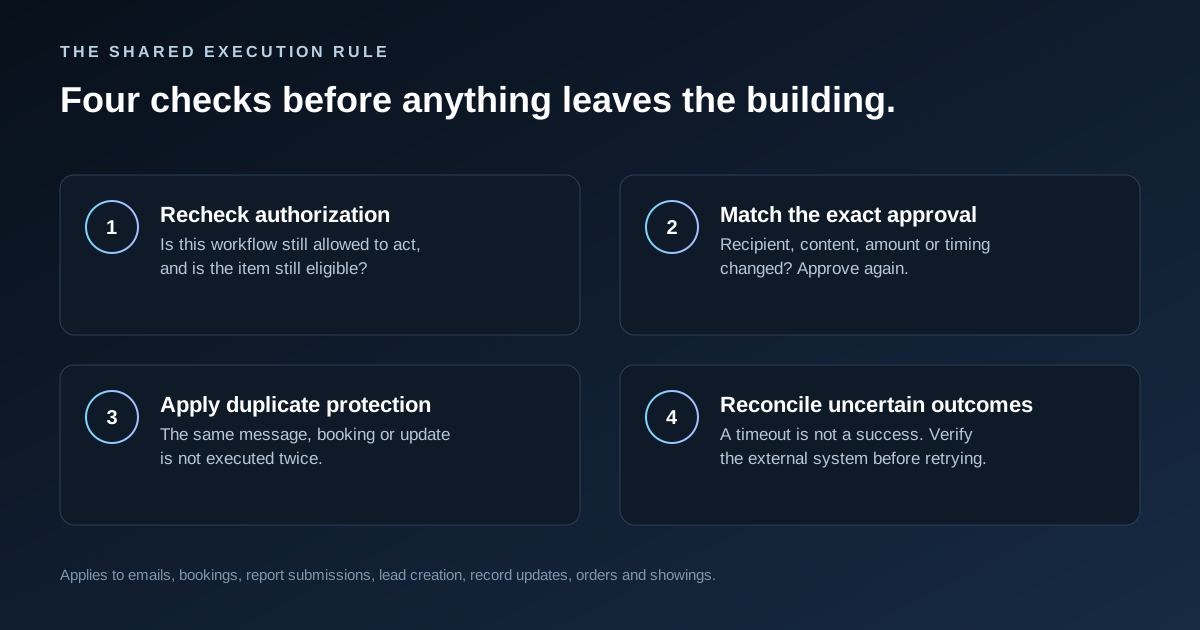
This rule applies whether the action is sending an email, reserving an appointment, submitting a report, creating a lead, updating a customer record, confirming an order, scheduling a showing, or sending a dealership follow-up.
How one lead moves through the harness
AI agents do the work. The harness controls how the work gets done. Here is the same idea as a map, using a real estate brokerage inquiry. Each box is one step; each branch is a decision the harness makes by rule, not by guesswork.
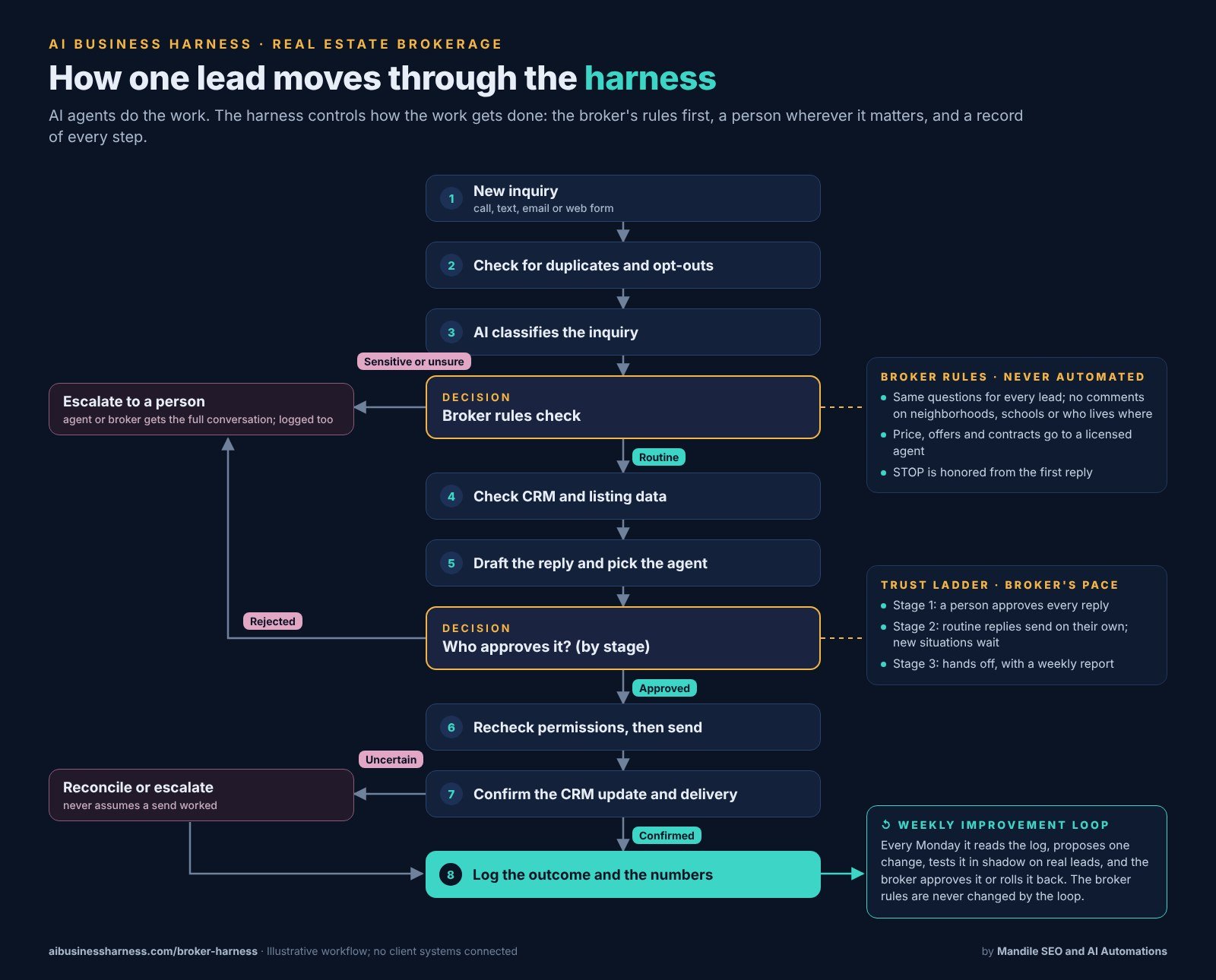
Open each case to follow its path through the map:
A routine buyer question at 8 PM
- The inquiry arrives from a listing page (step 1). It isn't a duplicate and the person hasn't opted out (step 2).
- It's classified as a routine showing question (step 3) and passes the broker rules check.
- The harness checks the listing is still active and finds the right agent by area and price range (steps 4 and 5).
- Stage 1: the agent taps approve. Stage 2: routine replies like this one send on their own.
- Permissions are rechecked, the reply goes out, and the CRM update is confirmed (steps 6 and 7). The time to first reply is logged (step 8).
A question about price, an offer or a neighborhood
- The inquiry is classified (step 3), and the broker rules check marks it sensitive.
- Nothing is drafted for the lead. The agent or broker gets the full conversation and handles it.
- The hand-off is logged (step 8), so the broker can see how often these come in and how fast they were picked up.
The lead texts STOP
- The opt-out check (step 2) catches it before anything else runs.
- No further messages go to that number, by rule. The loop is never allowed to change this.
- The opt-out is logged (step 8).
The CRM doesn't confirm the update
- The reply was sent (step 6), but the CRM write times out (step 7).
- The harness does not assume it worked. It retries once, then queues the item and marks it uncertain for a person to check.
- The uncertain result is logged (step 8), and if timeouts keep happening, the weekly review proposes a fix.
Every Monday, the weekly review reads that log and proposes one change: a script line, a routing rule or a timing. The change is tested in shadow next to the live playbook, and the broker approves it or rolls it back. How that loop works, and what it may never change: recursive self-improvement in the AI Business Harness. The brokerage version of this system: Broker Harness.
Illustrative AI business harness use cases
These examples illustrate operational principles. They do not claim that every listed integration or safeguard is already deployed. Actual capabilities depend on the business's systems, permissions, and tested integrations.
Enterprise: regulatory reference and internal policy Q&A
A financial-services team may want AI to help staff find policy information and prepare regulatory-reference drafts. The model can summarize a long document. The harness adds the controls around that work:
- Pulls from version-controlled, authoritative sources with effective dates and document identifiers
- Enforces role-based access
- Restricts sensitive information
- Flags missing citations, conflicts, or policy deviations for human review
- Requires action-bound compliance approval before external use
- Records necessary source, approval, and outcome evidence
- Uses duplicate protection and reconciliation for uncertain submissions
Automated checks can identify issues. They do not, by themselves, guarantee regulatory compliance.
Local service business: inquiry triage and appointment scheduling
A plumbing, electrical, HVAC, roofing, or IT-support business may receive inquiries while the owner or technician is working. The harness can:
- Classify new inquiries
- Identify urgent details
- Check the scheduling system and relevant inventory information
- Use the scheduling system's supported reservation and duplicate-protection controls
- Confirm only after a successful booking transaction
- Route high-value or complex work for owner review before quoting
- Reconcile timeouts instead of making unsupported promises
- Track response time, exceptions, and final status
The first workflow does not need to replace the office. It can prepare the work so the owner spends less time searching and more time deciding. A common starting point is an AI estimate follow-up workflow or an AI email assistant for small business.
Car dealership: inventory answers, lead routing, and test-drive requests
A dealership may want faster responses to inventory questions without allowing an AI system to invent financing terms or make unauthorized pricing commitments. The harness can:
- Query authorized inventory and CRM data
- Restrict outputs to approved customer-facing information
- Check for sensitive-data disclosure
- Keep pricing, financing, trade-in estimates, and discounts inside explicitly approved policies
- Validate test-drive requests against available vehicles and staff schedules
- Prevent duplicate lead creation, messages, or test-drive requests where supported
- Route exceptions to the appropriate manager
- Bind approval to the exact proposed action
- Reconcile failed CRM logging rather than dropping the lead
This is a practical place to measure response time, lead-routing accuracy, duplicate records, approval volume, follow-through, and exception rates. Do not assume a conversion improvement before testing.
Bakery: custom orders and allergen-safety routing
A bakery may use AI to organize custom cake inquiries, but ingredient keywords alone cannot establish true allergen safety. A controlled workflow can:
- Capture the requested design, date, size, and pickup details
- Route allergy and dietary-restriction requests to trained staff
- Require manual review of preparation and cross-contact risks
- Bind approval to the exact order and pickup time
- Queue uncertain POS or payment outcomes for staff review
- Prevent duplicate kitchen tickets or duplicate order records where supported
The harness should help organize the work without presenting automated text generation as a food-safety determination.
Real estate brokerage: property inquiries and showing coordination
A brokerage may want to respond faster to buyer inquiries while protecting confidential seller information and keeping showing decisions with the responsible agent. The harness can:
- Use the latest available authorized listing data and check listing status before preparing a response
- Keep lockbox codes, alarm information, credentials, and confidential seller details out of customer-facing output
- Route showing requests for separate approval, bound to the specific property, time, and entry method
- Route pricing requests for separate approval, bound to the specific proposed price or response
- Reconcile scheduling timeouts before confirming a showing
- Prevent duplicate showing requests where supported
- Retain communications for internal review
For a full worked example, see how a 60-agent Phoenix brokerage could use an AI Business Harness, from speed to lead through contract to close.
Logs support review, but they do not by themselves establish fair-housing compliance. Showing approval and pricing approval should remain separate because they are different actions with different risks.
How to choose a first AI workflow
The best first workflow is usually not the most impressive one. It is a repetitive process with a clear input, a clear finish line, a real cost when it slips, information that can be accessed, and a result that is easy to verify.
Score possible workflows on frequency, consistency, cost of delay or omission, access to required information, and risk if the workflow is wrong. Then define the finish line. Examples:
- "Every open estimate older than five days has a follow-up drafted for review."
- "Every new inquiry is classified and assigned."
- "Every test-drive request is checked against supported scheduling controls before confirmation."
- "Every inbound customer email is categorized and placed in the correct review queue."
Measure a baseline before changing the process. Useful baseline measures may include volume, handling time, delay, missed cases, approval time, exception rates, verified outcomes, duplicate actions, and manual corrections. Here's how to find the right workflow to automate.
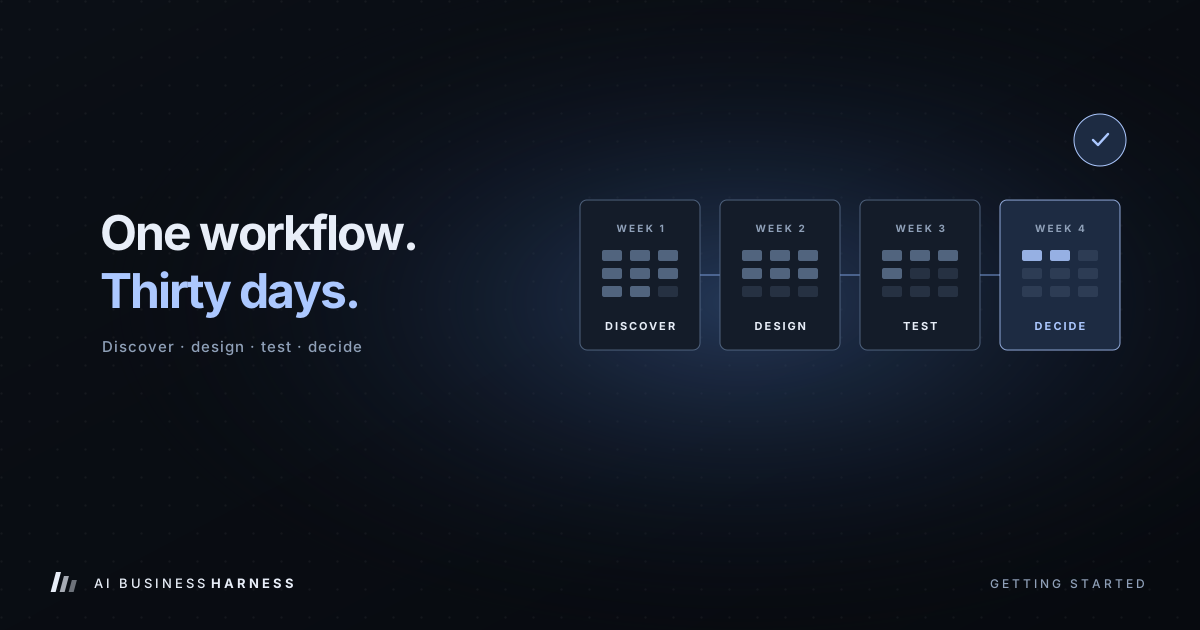
The 30-Day Installation, week by week
Week 1 — Discover and measure. Choose one workflow. Document the current steps, people involved, systems involved, existing delays, existing exceptions, and the current baseline.
Week 2 — Design and connect. Define the workflow steps, permissions, approval tiers, stop conditions, exception paths, logging requirements, and recovery behavior. Use sample data before customer-facing activity.
Week 3 — Test with controlled work. Run real inputs while holding customer-facing actions for approval. Record edits, rejections, exceptions, timeouts, reconciliation issues, missing information, and incorrect classifications.
Week 4 — Review. Compare the results with the baseline. Decide whether to keep, change, expand, reduce the scope of, or stop the workflow.
A 30-Day Installation should produce evidence, not just a demo. See the full 30-Day Installation.
What business value should you measure?
Do not begin with a promise of savings or revenue. Begin with a measurable workflow question:
- Did response time change?
- Did fewer inquiries remain unassigned?
- Did fewer estimates go without a follow-up draft?
- How much review time did each approved action require?
- How many drafts were edited, rejected, or escalated?
- Were duplicate actions or uncertain outcomes reconciled?
- Did the workflow create additional work for the team?
- Did follow-through improve under the agreed definition?
- Did the workflow reduce avoidable copying between systems?
- Did staff receive better information at the point of decision?
The right measure depends on the workflow. A harness is valuable when it helps the business see and improve how work gets done—not simply because an AI model was added.
Frequently asked questions
Is an AI business harness the same as an AI agent?
No. An agent chooses steps and uses tools toward a goal. A harness coordinates that work within business permissions, approvals, operating procedures, and monitoring. Those responsibilities may be built into the same system.
Does every business need multiple AI agents?
No. A defined workflow with one model call, rules, and human review may be enough. Use additional agents only when there is a clear reason to separate responsibilities, context, or permissions.
Can an AI business harness replace employees?
That should not be the default assumption. A well-designed harness can prepare information, draft work, route tasks, and surface exceptions while leaving decisions and accountability with the appropriate people.
Should AI send customer messages automatically?
The answer depends on the workflow's risk, permissions, testing, and approval design. A common starting point is to prepare customer-facing messages for human review rather than sending them automatically.
What happens when an AI integration fails?
The workflow should verify the external state, retry safely where supported, queue the work, or escalate to a person. It should not assume an uncertain action succeeded.
How do I know whether an AI workflow is worth building?
Start with one repeated task. Define the finish line, measure the baseline, limit the permissions, test with controlled work, and compare the result with the original process.
Start with one workflow
If your business has a repeated task that gets delayed, requires copying information between systems, depends on someone remembering to follow up, creates avoidable review work, or produces inconsistent customer responses, it may be a candidate for a controlled AI workflow.
AI Business Harness can help frame the workflow, identify the required systems and controls, and determine what should remain under human review before anything touches live customer communication.
A capable model is one component. Business value comes from connecting it to the right information, tools, permissions, and review process—and measuring whether the resulting workflow saves time or improves follow-through.